
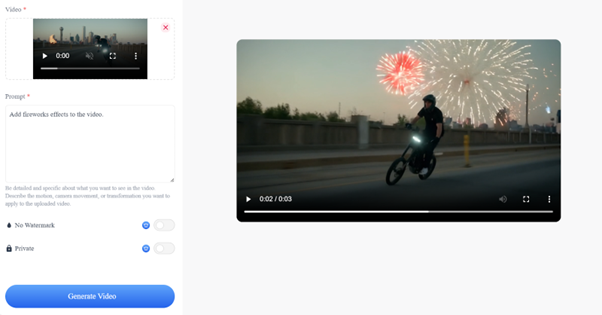
Runway Aleph offers a new approach: one where video can be modified using natural language prompts instead of manual timelines and keyframes. This shift doesn’t replace creative judgment it retools the workflow, lowering barriers and opening new possibilities for experimentation and iteration.You can access Runway Aleph at RunAleph.com. Simply upload the video you want to edit and a text to edit it.
The Future of Video Editing Traditional Editing vs. Runway Aleph AI Video Editing
In the world of video production, traditional editing methods have long been the standard. Skilled video editors would spend hours, sometimes days, manually cutting, arranging, and fine-tuning footage to achieve the desired result. This process often requires extensive knowledge of editing software, a high level of precision, and a significant investment of time. Whether it's adjusting lighting, removing unwanted objects, or reimagining entire scenes, traditional editing can be a time-consuming and expensive affair.
However, Runway Aleph AI model transforms the video production landscape. No longer do content creators need to rely solely on professional software and years of expertise to achieve stunning edits. With just a few simple text prompts, Runway Aleph allows anyone to perform complex video edits making it as easy as describing the changes you want to see.
By uploading a short video and describing what you want changed, the AI instantly transforms the footage, delivering high-quality results in a fraction of the time. This new approach opens the door for creators of all skill levels, from seasoned filmmakers to casual content creators, to produce professional-level videos.
With Runway Aleph, video editing becomes faster, more efficient, and accessible to a wider audience. Whether you're making small tweaks or completely transforming a scene, the power of AI video editing is now at your fingertips. Runway Aleph AI is set to redefine the way videos are created and edited ushering in a future where creativity can flourish without being hindered by technical limitations.
Runway Aleph's Core Functionality: Optimizing Video Editing Workflows
Runway Aleph is a groundbreaking platform that takes AI video editing to a whole new level, enabling creators to edit videos with just a few simple words. With its cutting-edge Aleph AI technology, Runway Aleph provides an efficient and intuitive way to transform video content. Whether you're a filmmaker, digital artist, or social media content creator, the platform offers a range of features designed to make your video production faster, more creative, and accessible.
Runway Aleph AI Video Editing: Add, Remove, and Transform with Ease
Runway Aleph AI Video Editing empowers users to effortlessly modify videos based on simple text prompts. You can add, remove, or transform elements within your video content, all powered by the Runway Aleph AI Video model. Whether it's adding objects or characters, removing distractions, or changing specific visual aspects, Runway Aleph can make these edits with remarkable precision. The AI understands the spatial and motion context of your video, allowing for seamless changes without the need for complex video editing skills.
For example, you can describe an object you'd like to add to the scene, or simply tell the AI to remove an unwanted element. Runway Aleph video edits are done automatically, allowing you to focus on the creative aspects without worrying about time-consuming technical tasks.
Generate New Camera Angles with the Runway Aleph
Another standout feature of Runway Aleph is its AI video model that can generate new camera angles. If you're looking to get a fresh perspective on your video, simply describe the angle you want whether it's a bird’s-eye view or a close-up and the AI will generate it for you. This eliminates the need for additional shooting or expensive camera setups.
This feature is especially useful for filmmakers who want to create dynamic scenes from different viewpoints. With Runway Aleph, you can easily experiment with angles and enhance your storytelling, all with a few descriptive words.
Reshape and Adjust Scene Lighting with Runway Aleph
Lighting is a critical element in setting the mood of a video, and Runway Aleph makes it easy to adjust the lighting in your scenes. Whether you need to brighten a dark shot, simulate a sunset glow, or create dramatic shadows, Runway Aleph can reshape and adjust lighting based on your description.
With, you don't need professional lighting equipment or hours of setup time. The AI applies lighting changes automatically, giving your videos the perfect ambiance with minimal effort.
Isolate Elements for Advanced Editing with Runway Aleph
For more advanced editing tasks, Runway Aleph allows users to isolate specific elements within a scene. Whether it's focusing on a particular object, character, or background, Runway Aleph can seamlessly separate and isolate parts of your footage. This capability is particularly valuable for special effects and video compositing.
By using Runway Aleph to isolate and manipulate individual elements, you can create more complex scenes and integrate various video layers to produce polished results.
How to Access Runway Aleph Free Online
Discover Runway Aleph’s cutting-edge AI video editing tools through its free trial, perfect for those eager to test the platform without a paid subscription. By visiting https://runaleph.com/
and creating an account, you’ll gain access to a limited set of credits to explore features like AI-enhanced video modifications, scene crafting, object editing, and camera angle adjustments all driven by simple text instructions.
Follow these steps to experience Runway Aleph’s powerful AI-driven video editing capabilities:
Upload a Video Clip: Start by selecting a short video, up to 5 seconds in length, from your device. Ensure the clip is clear and relevant to the edits you want to test, as this will help the AI deliver the best results.
Enter a Text Prompt: Describe the changes you want to make using a concise text prompt. For example, you might type “replace the background with a sunny beach” to swap out the existing backdrop or “add a flying bird to the scene” to introduce a new element. Be specific to achieve precise results, but feel free to experiment with creative ideas like “turn the sky purple” or “add a futuristic car.”
Let the AI Work Its Magic: Once you submit your video and prompt, Runway Aleph’s AI will process your request. The platform leverages advanced algorithms to analyze your input and generate a transformed video, typically within a few minutes. You’ll receive a notification when your edited clip is ready to view or download.
Review and Refine: Watch the AI-generated video to see the results of your prompt. If you have additional trial credits, you can tweak your prompt or upload a new clip to experiment further. This step allows you to explore the flexibility of Runway Aleph’s editing tools and discover how different prompts affect the outcome.
Real-World Applications of Runway Aleph
Runway Aleph offers a wide range of real-world applications that can be used across various industries, making video creation and editing easier, faster, and more creative. Whether you're a filmmaker, marketer, or content creator, Runway Aleph provides powerful tools to enhance your videos with just a few simple prompts.
Change a Character's Outfit
With Runway Aleph, you can change the clothes of a character in a video without reshooting. By simply describing the new outfit, the AI adjusts the video to reflect the changes, allowing for endless customization. This is particularly useful in fashion videos, promotional content, or any project where you need to rapidly change a character’s appearance without the hassle of costume changes or re-filming.
Re-light Your Scene
Lighting is crucial in setting the mood of a video. With Runway Aleph, you can easily adjust the lighting of a scene to fit different times of day or create a particular atmosphere. Whether you want to simulate a sunset, enhance the brightness, or add dramatic shadows, the AI can instantly modify the lighting to match your desired look no professional lighting equipment needed.
Remove Objects from Your Scene
Sometimes, unwanted elements can distract from the main focus of a video. With Runway Aleph, you can remove objects or people from a scene with ease. Whether it’s an unwanted prop in the background or a distracting element that takes attention away from your subject, simply describe what needs to be removed, and the AI will seamlessly eliminate it from the video.
Change the Weather in Your Scene
Need to transform a sunny day into a rainy one? Or perhaps you'd like to add some fog to create a mysterious atmosphere? With Runway Aleph, you can change the weather in a scene with just a few words. The AI can generate realistic weather effects, such as rain, snow, or fog, making it perfect for adapting videos to different moods or locations without the need for complex special effects or reshoots.
The Future of Video Creation with Runway Aleph
Runway Aleph AI is revolutionizing video editing by making advanced AI tools accessible to everyone. With the ability to add, remove, and transform objects, generate new angles, and adjust lighting all with just a few text prompts RunAleph.com's Runway Aleph simplifies the video creation process for filmmakers, marketers, and content creators alike.